# Description
This document guides you through upgrading from version 1.9 to 1.10. Users of the original 1.5 version are advised to first upgrade to 1.6 before proceeding with sequential upgrades.
For additional considerations, refer to the blog post here (mandatory reading!) (opens new window)
# Environment Requirements
Environment requirements remain unchanged.
# Performing the Upgrade
WARNING
Due to significant changes in data tables, it is recommended to perform the update during downtime (e.g., stop Nginx)!
Dependencies have not changed significantly. You can use the --include_composer option to directly overwrite the composer.json file. If you have added custom content, back it up first so you can manually re-add it later.
Alternatively, manually modify composer.json based on the following changes.
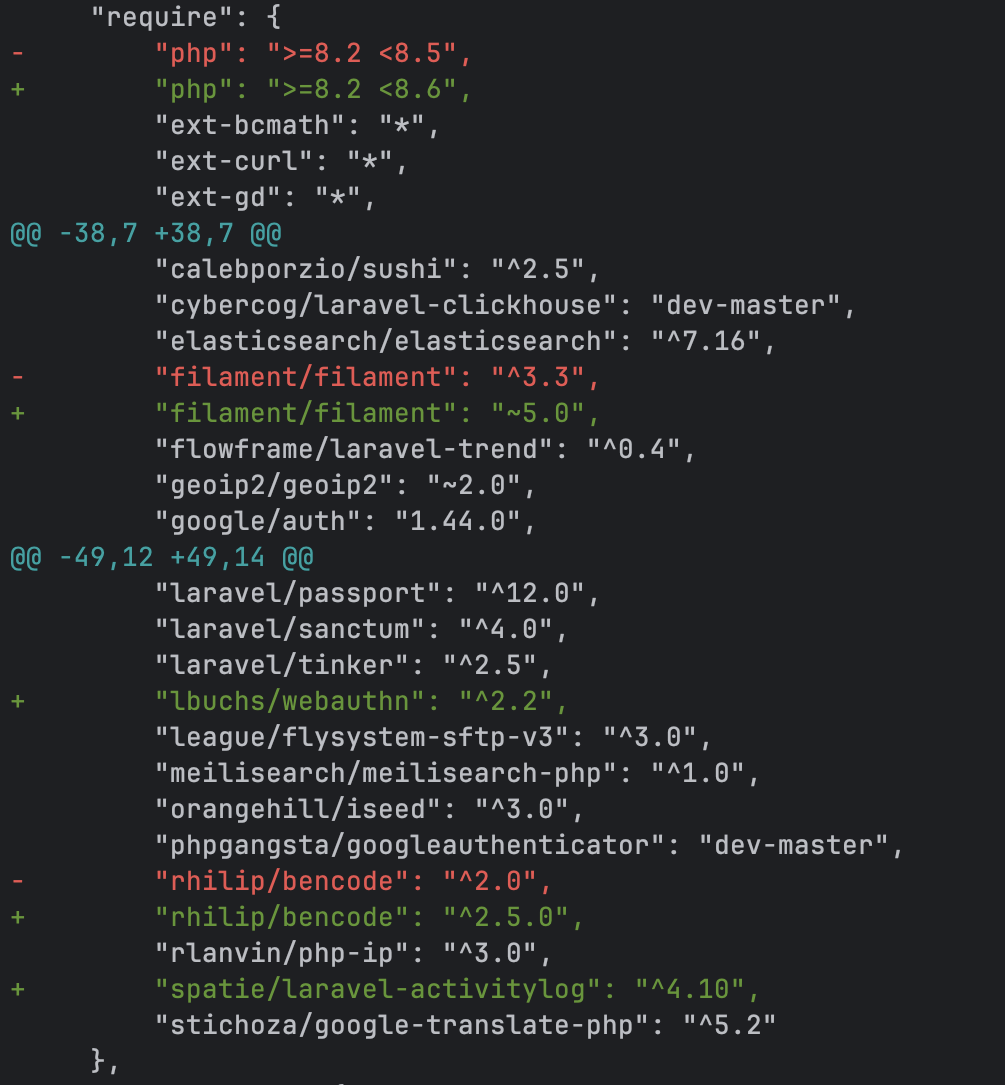
Next, delete composer.lock and execute the following commands:
# Download latest code
php artisan nexus:update --tag=1.10.0 --include_composer

# Install dependencies
composer install

# Execute upgrade
php artisan nexus:update
php artisan filament:upgrade
WARNING
After upgrading, install version 3.x for plugins to ensure proper functionality
# Upgrading Between 1.10 Versions
For users who haven't modified code:
# Download code (use --tag=dev for latest dev branch)
php artisan nexus:update --tag=1.10.x

# Execute update
php artisan nexus:update

# Restart supervisor (Pagoda users can do this via the interface; Docker users should restart the queue service)
supervisorctl reload
← Upgrade 1.9 FAQ →